I was installing Microsoft SQL Server 2012 on a development server and kept getting an annoying error message:
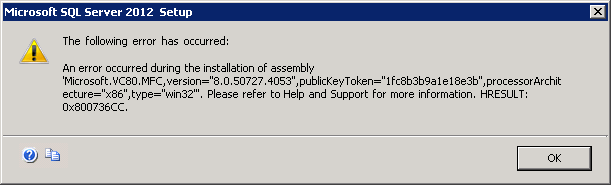
The following error has occurred:An error occurred during the installation of assembly ‘Microsoft.VC80.MFC,version=”8.0.50727.4053″,publicKeyToken=”1fc8b3b9a1e18e3b”,processorArchitecture=”x86″,type=”win32″‘. Please refer to Help and Support for more information. HRESULT: 0x800736CC.
For help, click: http://go.microsoft.com/fwlink?LinkID=20476&ProdName=Microsoft%20SQL%20Server&EvtSrc=setup.rll&EvtID=50000&ProdVer=11.0.2100.60&EvtType=0xDF039760%25401201%25401
KB Article 2688946 describes a very similar issue. I eventually found a fix in the form of Cumulative Update 2 (KB2703275) Here is what you need to do to fix it:
- Completely close the SQL 2012 installer (it might just crash and close itself).
- Use Control Panel to uninstall Microsoft Visual C++ 2010 x64 Redistributable and Microsoft Visual C++ 2010 x86 Redistributable.
- Download Cumulative Update 2 from http://support.microsoft.com/hotfix/KBHotfix.aspx?kbnum=2703275&kbln=en-us (449398_intl_x64_zip.exe)
- Create C:\Updates
- Extract 449398_intl_x64_zip.exe to C:\Updates to get SQLServer2012-KB2703275-x64.exe
- Run the Installer again from the command line with the following (all on one line):
setup.exe /Action=Install /UpdateEnabled=True /UpdateSource="C:\Updates" - Install as usual and the issue goes away.
Let me know if this worked for you by leaving a comment. I’m curious to know how widespread this issue is.
6 Responses to “Microsoft SQL Server Installation Issue Fix”
Hello
I have the same failure when I’m installing SQL Server 2012 on windows server std ed 2012 R2. I follow your method but it is not solve the problem find bellow the log file content :
Overall summary:
Final result: Échec : voir les détails ci-dessous
Exit code (Decimal): -2068052081
Start time: 2014-03-29 18:47:33
End time: 2014-03-29 19:12:23
Requested action: Install
Setup completed with required actions for features.
Troubleshooting information for those features:
Next step for Adv_SSMS: Consultez les informations suivantes pour résoudre le problème puis recommencez le processus d’installation.
Next step for SSMS: Consultez les informations suivantes pour résoudre le problème puis recommencez le processus d’installation.
Next step for SQLEngine: Consultez les informations suivantes pour résoudre le problème puis recommencez le processus d’installation.
Machine Properties:
Machine name: SQL2012
Machine processor count: 4
OS version: Future Windows Version
OS service pack:
OS region: France
OS language: français (France)
OS architecture: x64
Process architecture: 64 bits
OS clustered: Non
Product features discovered:
Product Instance Instance ID Feature Language Edition Version Clustered
Package properties:
Description: Microsoft SQL Server 2012
ProductName: SQL Server 2012
Type: RTM
Version: 11
Installation location: C:\sql\x64\setup\
Installation edition: Standard
Slipstream: True
SP Level 0
Patch Level: 11.0.2325.0
Product Update Status:
Réussite : KB 2703275
Product Updates Selected for Installation:
Title: Hotfix Pack
Knowledge Based Article: KB 2703275
Version: 11.0.2325.0
Architecture: x64
Language: Toutes
Update Source: C:\update
Paramètres des entrées d’utilisateur :
ACTION: Install
ADDCURRENTUSERASSQLADMIN: false
AGTSVCACCOUNT: NT Service\SQLSERVERAGENT
AGTSVCPASSWORD: *****
AGTSVCSTARTUPTYPE: Manual
ASBACKUPDIR: Backup
ASCOLLATION: Latin1_General_CI_AS
ASCONFIGDIR: Config
ASDATADIR: Data
ASLOGDIR: Log
ASPROVIDERMSOLAP: 1
ASSERVERMODE: MULTIDIMENSIONAL
ASSVCACCOUNT:
ASSVCPASSWORD:
ASSVCSTARTUPTYPE: Automatic
ASSYSADMINACCOUNTS:
ASTEMPDIR: Temp
BROWSERSVCSTARTUPTYPE: Disabled
CLTCTLRNAME:
CLTRESULTDIR:
CLTSTARTUPTYPE: 0
CLTSVCACCOUNT:
CLTSVCPASSWORD:
CLTWORKINGDIR:
COMMFABRICENCRYPTION: 0
COMMFABRICNETWORKLEVEL: 0
COMMFABRICPORT: 0
CONFIGURATIONFILE: C:\Program Files\Microsoft SQL Server\110\Setup Bootstrap\Log\20140329_184252\ConfigurationFile.ini
CTLRSTARTUPTYPE: 0
CTLRSVCACCOUNT:
CTLRSVCPASSWORD:
CTLRUSERS:
ENABLERANU: false
ENU: false
ERRORREPORTING: false
FEATURES: SQLENGINE, SSMS, ADV_SSMS
FILESTREAMLEVEL: 0
FILESTREAMSHARENAME:
FTSVCACCOUNT:
FTSVCPASSWORD:
HELP: false
INDICATEPROGRESS: false
INSTALLSHAREDDIR: C:\Program Files\Microsoft SQL Server\
INSTALLSHAREDWOWDIR: C:\Program Files (x86)\Microsoft SQL Server\
INSTALLSQLDATADIR:
INSTANCEDIR: C:\Program Files\Microsoft SQL Server\
INSTANCEID: MSSQLSERVER
INSTANCENAME: MSSQLSERVER
ISSVCACCOUNT: NT AUTHORITY\Network Service
ISSVCPASSWORD:
ISSVCSTARTUPTYPE: Automatic
MATRIXCMBRICKCOMMPORT: 0
MATRIXCMSERVERNAME:
MATRIXNAME:
NPENABLED: 0
PID: *****
QUIET: false
QUIETSIMPLE: false
ROLE:
RSINSTALLMODE: DefaultNativeMode
RSSHPINSTALLMODE: DefaultSharePointMode
RSSVCACCOUNT:
RSSVCPASSWORD:
RSSVCSTARTUPTYPE: Automatic
SAPWD:
SECURITYMODE:
SQLBACKUPDIR:
SQLCOLLATION: French_CI_AS
SQLSVCACCOUNT: NT Service\MSSQLSERVER
SQLSVCPASSWORD:
SQLSVCSTARTUPTYPE: Automatic
SQLSYSADMINACCOUNTS: MASOCIETE\SqlAdminsvc
SQLTEMPDBDIR:
SQLTEMPDBLOGDIR:
SQLUSERDBDIR:
SQLUSERDBLOGDIR:
SQMREPORTING: false
TCPENABLED: 1
UIMODE: Normal
UpdateEnabled: true
UpdateSource: C:\update
X86: false
Configuration file: C:\Program Files\Microsoft SQL Server\110\Setup Bootstrap\Log\20140329_184252\ConfigurationFile.ini
Detailed results:
Feature: Outils de gestion – Complet
Status: Échec : voir les journaux pour plus de détails
Reason for failure: Une erreur liée à une dépendance du composant s’est produite, entraînant l’échec du processus d’installation du composant.
Next Step: Consultez les informations suivantes pour résoudre le problème puis recommencez le processus d’installation.
Component name: Fichiers de support du programme d’installation de SQL Server 2008
Component error code: 1935
Component log file: C:\Program Files\Microsoft SQL Server\110\Setup Bootstrap\Log\20140329_184252\SqlSupport_KatmaiRTM_Cpu64_1.log
Error description: Une erreur s’est produite pendant l’installation de l’assembly « Microsoft.VC80.MFC,version=”8.0.50727.1833″,publicKeyToken=”1fc8b3b9a1e18e3b”,processorArchitecture=”amd64″,type=”win32″ ». Pour plus d’informations, référez-vous à Aide et support. HRESULT : 0x800736CC.
Error help link: http://go.microsoft.com/fwlink?LinkId=20476&ProdName=Microsoft+SQL+Server&EvtSrc=setup.rll&EvtID=50000&ProdVer=11.0.2100.60&EvtType=SqlSupport.msi%40CreateShortcuts%401935%3a0x800736CC
Feature: Outils de gestion – De base
Status: Échec : voir les journaux pour plus de détails
Reason for failure: Une erreur liée à une dépendance du composant s’est produite, entraînant l’échec du processus d’installation du composant.
Next Step: Consultez les informations suivantes pour résoudre le problème puis recommencez le processus d’installation.
Component name: Fichiers de support du programme d’installation de SQL Server 2008
Component error code: 1935
Component log file: C:\Program Files\Microsoft SQL Server\110\Setup Bootstrap\Log\20140329_184252\SqlSupport_KatmaiRTM_Cpu64_1.log
Error description: Une erreur s’est produite pendant l’installation de l’assembly « Microsoft.VC80.MFC,version=”8.0.50727.1833″,publicKeyToken=”1fc8b3b9a1e18e3b”,processorArchitecture=”amd64″,type=”win32″ ». Pour plus d’informations, référez-vous à Aide et support. HRESULT : 0x800736CC.
Error help link: http://go.microsoft.com/fwlink?LinkId=20476&ProdName=Microsoft+SQL+Server&EvtSrc=setup.rll&EvtID=50000&ProdVer=11.0.2100.60&EvtType=SqlSupport.msi%40CreateShortcuts%401935%3a0x800736CC
Feature: Services Moteur de base de données
Status: Échec : voir les journaux pour plus de détails
Reason for failure: Une erreur liée à une dépendance du composant s’est produite, entraînant l’échec du processus d’installation du composant.
Next Step: Consultez les informations suivantes pour résoudre le problème puis recommencez le processus d’installation.
Component name: Fichiers de support du programme d’installation de SQL Server 2008
Component error code: 1935
Component log file: C:\Program Files\Microsoft SQL Server\110\Setup Bootstrap\Log\20140329_184252\SqlSupport_KatmaiRTM_Cpu64_1.log
Error description: Une erreur s’est produite pendant l’installation de l’assembly « Microsoft.VC80.MFC,version=”8.0.50727.1833″,publicKeyToken=”1fc8b3b9a1e18e3b”,processorArchitecture=”amd64″,type=”win32″ ». Pour plus d’informations, référez-vous à Aide et support. HRESULT : 0x800736CC.
Error help link: http://go.microsoft.com/fwlink?LinkId=20476&ProdName=Microsoft+SQL+Server&EvtSrc=setup.rll&EvtID=50000&ProdVer=11.0.2100.60&EvtType=SqlSupport.msi%40CreateShortcuts%401935%3a0x800736CC
Feature: SQL Browser
Status: Réussite
Feature: SQL Writer
Status: Réussite
Feature: Connectivité client de SQL
Status: Réussite
Feature: Kit de développement logiciel (SDK) de l’option Connectivité client de SQL
Status: Réussite
Rules with failures:
Global rules:
Scenario specific rules:
Rules report file: C:\Program Files\Microsoft SQL Server\110\Setup Bootstrap\Log\20140329_184252\SystemConfigurationCheck_Report.htm
I have been trying to install SQL Server 2012 on Windows 10 for two weeks!
Your solution worked for me.
Thank you very much.
on August 6th, 2016 at 1:15 pm #
[…] I’m getting the exact same error message as see in this blog post: http://blog.shawndowler.com/2012/06/25/microsoft-sql-server-installation-issue-fix/ […]
Your solution worked for me, I am able to install sql 2012
Thank you very much for your post saved me a day
how to download hotfix
i dont have microsoft account