Record Streaming Audio with Linux: Part I

Update: For a better solution check out this newer post

I happen to enjoy listening to Glenn Beck. The problem is that I can’t receive his weekday shows where I live. Even if I could receive his weekday show over the air, I wouldn’t hear most of it because I am busy working all day.

The solution: cron and mplayer with a little help from sox.

Here’s a sample script:

#!/bin/bash
# Use mplayer to capture the stream
# at $STREAM to the file $FILE

DATE=`date +%d-%b-%Y` # Save the date as DD-Mmm-YYYY
YEAR=`date +%Y` # Save just the year as YYYY

# Where you want the file saved. Leave off file extension
FILE=/home/shawn/PodCasts/Glenn_Beck_Show_$DATE

# The following file should be a playlist file such as .asf or .asx
# You can also create your own file with a URI and put it here
STREAM=/home/shawn/bin/glenn_beck_show-6-9am
DURATION=3.1h # enough to catch the show, plus a bit
#DURATION=200s # a quick run, just for testing

# For the id3v2 Tags
AUTHOR="Glenn Beck"
ALBUM="104.7 WPGB-FM Pittsburgh"
TITLE="Glenn Beck Show - $DATE"

# Capture Stream
/usr/bin/mplayer -really-quiet -cache 500 \
-ao pcm:file="$FILE.wav" -vc dummy -vo null \
-playlist $STREAM &
# the & turns the capture into a background job
sleep $DURATION # wait for the show to be over
kill $! # kill the stream capture

# remove gaps and convert to mono
sox $FILE.wav -c 1 $FILE-silenced.wav \
silence 1 -0.9 2% -1 -0.9 2% ;
rm $FILE.wav ; #remove original capture

# Encode to .mp3, mono 32kHz 32kb/s, and tag the file
lame -a -m m --tt "$TITLE" --ta "$AUTHOR" \
--tl "$ALBUM" --ty "$YEAR" --vbr-new -V 9 \
--resample 32 $FILE-silenced.wav $FILE.mp3 ;
rm $FILE-silenced.wav # Remove the raw audio data file

Once all of the variables have been set, make this executable and make a cron job for it.
crontab -e

Here’s an example for starting at 6am every weekday:
0 6 * * 1-5 /home/shawn/bin/glenn_beck.sh >& /dev/null

Notes

  • The basis for this script is the one found at this Linux Journal article.
  • You need at least SoX version 12.17.9 for the silence filter to work properly.
  • MPlayer should be fairly recent. Older versions have a different syntax for pcm (wav) audio output
  • This solution still requires huge amounts of disk space (~500MB/hour). I am still experimenting with using named pipes (fifos) to do all of the file processing in RAM and only output the final encoded file to the disk.
links for 2006-02-27

Rock and Suck

In a blog posting at his website, rentzsch.com, Jon discusses a scanner that he recently purchased for his computer. He describes its overall quality in the following way:

It’s not rock, but it’s not suck. Apparently, nonsuck is the best the scanner market currently offers.

This is one of the most efficient descriptions of any product’s quality that I’ve ever seen. The verbs to rock and to suck (meaning to be good or to perfom well, and to be bad or to perform poorly respectively) have been “nouned” here. Usually Nouns get “verbed” in English, but here we see the opposite. A more standard rendering of this sentence would be: “It doesn’t rock, but it doesn’t suck.”

Amazon’s Recommendations

I was looking at “Weird Al” Yankovic’s album “Poodle Hat” on Amazon.com today and couldn’t help but be reminded of that old Sesame Street song “One of These Things is Not Like the Others.” This is what it said:

Customers who bought titles by Weird Al Yankovic also bought titles by these artists:

  • Dr. Demento
  • Rammstein
  • Adam Sandler
  • Bob Rivers
  • Allan Sherman

Dell BIOS Updates

I find it increasingly preposterous that the BIOS updates I want to install are distributed in the form of executables with floppy disc images buried within them. I really would find it a lot more useful if they would allow you to download just the image files. Then I’d be able to use dd on *NIX machines to write floppies.

Of course, this is all rather interesting considering that the laptop I wish to flash to BIOS on doesn’t even have a floppy drive, but that’s another point altogether.

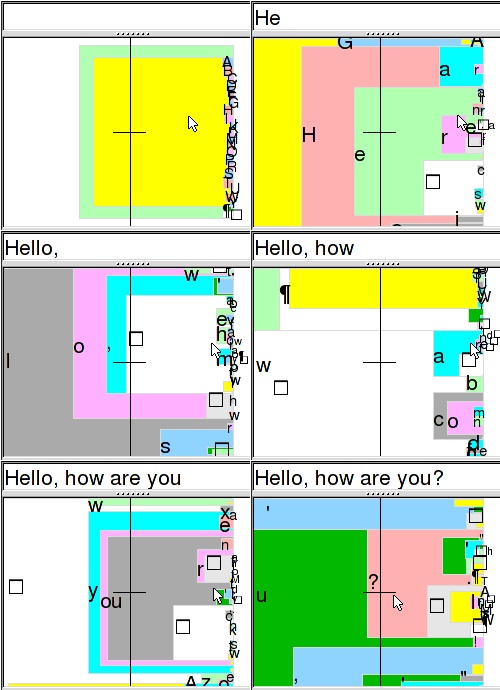
Dasher: Innovative Data Entry Technology

Dasher Demonstration

Dasher is an amazing technology for inputting text in the absence of a keyboard interface. When I saw this for the first time it just blew me away. From their website:

Dasher is a zooming interface. You point where you want to go, and the display zooms in wherever you point. The world into which you are zooming is painted with letters, so that any point you zoom in on corresponds to a piece of text. The more you zoom in, the longer the piece of text you have written. You choose what you write by choosing where to zoom.

Dasher is being developed by the Inference Group at the Cavendish Laboratory, Cambridge.

This really has to be tried to be understood well. I believe an interface very similar to this will be finding its way onto handheld devices in the very near future. It’s currently in active development for handheld devices and there are videos of Dasher being demonstrated on an iPaq.

As if this functionality weren’t enough, the team is also working to develop mechanisms for people with disabilities to reach high-speed and high-accuracy levels by innovating multiple interfaces to control Dasher including tracking eye-movements, using large buttons, and breathing as an input method.